Find out More:
Birds of a Feather Can Twitter Together (good introduction to Twitter)
Twitter: Is Brevity The Next Big Thing?
5 Ways to Use Twitter for Good
Twitter Support/FAQ
Try It Out!
- Log into the Library's Twitter Account
- Go to: http://www.twitter.com
- user name: mmscl
- password: mmscl11967
- Read the tweets that MMSCL is following - you'll see breaking news, trivia and some goofy stuff
- Post about a program or recommended book or movie - remember, it's got to be under 140 characters!
- Start your own twitter account! You can friend MMSCL and lots of other Twitterers.
- Go back to the blog you created in exercise #3 and create a blog post about your experience. Include the comment you made on the MMSCL twitter account. Be sure to visit the staff page to submit this exercise as described in exercise #1. Don't forget to add a link to your blog posting.
_____________________________________________________
Recording Progress:
Recording progress on the staff page is as easy as cut-n-paste.
First you'll need to sign up. This will be covered in the directions for activity #1.
For the first two activities, just check off the appropriate check box as discussed in "Sign up for MMSCL 2.0". Once you start recording your discoveries through your own blog (activity #3), you will need to check-off the item and enter the permanent link to the individual blog post that covers the exercise or "thing."
Depending upon the Blogger template that you selected, the "permanent link" for each individual post can be found either through the post’s title or through a link in the posts footer area the contains the date.
To record progress for an individual item on the Staff Page:
- Log in to your blogger.com account that you created in activity #3.
- Click on the permanent link for the individual post.
Example:
Here is where you would find the perma link for this sample blog post: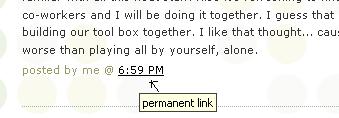
Click on this link to see actual post. - Select the "permanent link" url from the address bar at the top of your browser and right click. Select Copy.
- Follow the instructions from item #1: Sign up for MMSCL 2.0.
- Right click on the address line for the item and select Paste.
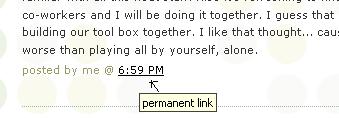
See, it's as easy and copy-n-paste!
Your staff information page should now show a light grey "OK" image. After your activity has been reviewed and approved, the "OK" image will turn purple.


24 comments:
I'm not crazy about Twitter...checked it out but I don't know that I would use it again.
Ditto to Linda's comment. I'd rather email than use Twitter and get more details, info.
Twitter is ok, iv never been on before today but might go on again in the future!!!
Eh, twittering. TMI.
I found twitter to be very confusing. I don't think I would use it again. I don't really think it is helpful.
I've tried it before, and the second time was no different. I just don't think twitter is for me.
Here's a cute informative video about the power of twitter:
http://video.nytimes.com/video/2009/02/12/technology/personaltech/1194837757843/twitter.html
I'm not crazy about Twitter, I agree it's confusing and I don't get the point. It's a weak version of facebook.
As of now, I am not a fan of twitter.
I think it is just another thing that costs a lot of time. Do not think I am going to use it. TMI
I'm twittering for the one and only time in my life. I'd rather spend time reading a good book.
Who has time for this????
Really is it necessary for me to know what you're doing every minute of the day. I think it's a little creepy.
What's it got to do with good library service?
I am a little confused, but I am hearing more and more about twitter so, hopefully, I get the hang of it soon. The comment that I left on the library's twitter account was, "I am in the middle of reading Host by Stephenie Meyer and it is fantastic!"
I could see using if LOTS of spare time vay-kay or retirement! Not so much!
I thought Twitter was ok, it's not something I would visit that often.
I don't think Twitter is for me.
Latest: looking at twitter and saying why would I want to use this?less than 5 seconds
first time twittering, not loving it.
Check out this great post from a fellow MMSCL 2.0 participant:
I tweeted this message from our account today:
"Twitter can be fun. Shaq is on here (@THE_REAL_SHAQ), and so is Neil Gaiman (@neilhimself). Celebrities tend to get personal with fans here"
I feel that this is a subject that should have definitely been brought up when we were introduced as a whole to Twitter. Lots of celebrities have personal twitter accounts which they use to chat with fans. Here's just some that I know of personally, and have even talked to a few of them which I never would have if it wasn't for Twitter. Actually, I don't know a single person on my twitter "friends list" personally, yet I still use it every day and have a great time talking to and joking around with some relatively famous people sometimes.
From TV:
Rainn Wilson from The Office (http://twitter.com/rainnwilson)
Stephen Colbert of The Colbert Report (http://twitter.com/StephenColbert) [He's not so active anymore, but you never know if he'll be back]
Will Wheaton of Star Trek infamy [And all around good geeky guy] (http://twitter.com/wilw)
Greg Grunberg from Heroes (http://twitter.com/greggrunberg)
Brea Grant from [also from] Heroes (http://twitter.com/breagrant)
Joel McHale, host of The Soup on E (http://twitter.com/joelmchale)
Ryan Seacrest, host of American Idol (http://twitter.com/ryanseacrest)
William Shatner (http://twitter.com/WilliamShatner)
Bands and Music:
The band Jimmy Eat World tweets all the time, sometimes even while they're preforming. They've asked via Twitter for feedback and even song requests mid concert (http://twitter.com/jimmyeatworld)
Coling Meloy, the lead of the band The Decemberists also tweets. Actually because of twitter, I just found out that they have a new album out (http://twitter.com/colinmeloy)
Coldplay (http://twitter.com/coldplay)
Plus plenty more that I probably just haven't found yet.
More and more people as well as celebrities are realizing the benefits of having an instantaneous way to reach "the masses." Like this past weekend when Shaquille O'Neal was bored so he sat outside in public and tweeted that the first person to come to him from Twitter would get a prize. Within minutes, he sent out another tweet to tell everybody that he had a winner and then he spent some time hanging out with the group of fans and followers that had come to find him.
Some schools use Twitter to relay messages (like the law schools listed here: http://socialmedialawstudent.com/twitter/how-law-schools-are-using-twitter/), as do some Police Precincts. It was also used back in 2007 to quickly spread information and warnings about the Californian wildfires (http://blog.wired.com/27bstroke6/2007/10/firsthand-repor.html).
Now there is also TwitPic (http://twitpic.com/), a service used to send a quick link for an image to your Twitter timeline. You can take a picture, and within seconds everybody who's following you can actually see what you're doing. It might not seem like you'd have many uses for it, but there are plenty. And again, some celebs are very fond of using this service to send out behind the scenes pictures or sneak peeks.
I'm sure many people think there's no point to Twitter, and I know I've heard plenty of people say "What do I care what you're doing?" or "Who cares if you're going to the bathroom, why are you telling me?" And honestly, I agree with those people. Twitter prompts you with the question: "what are you doing right now?" but that definitely doesn't mean you have to answer that question for every little thing you do. You don't have to ever send a tweet yourself, or even talk to anyone on Twitter. Sometimes just following people can be entertaining enough. Some people link informative news posts, entertaining videos, and sometimes even behind the scenes information and pictures from TV shows and movies. Just a fair warning though: unlike on television, the Internet isn't usually censored. But in my experience, not many twittering celebrities have extremely dirty mouths.
So if you didn't think you would like it, give it another try. And this time you don't have to make it personal. You might think "Who cares what I'm doing?" and you know what, you're probably right (no offense of course), but theres plenty of interesting people out there, and you never know what you can learn in just 140 characters or less.
I already have a facebook status that I update like crazy...Twitter is making me think I am way more important than I am, haha. No one really cares what I am doing every minute of every day so...I'll stick to pretending I matter via facebook updates :)
Twitter is like life at a bulletin board.. No one wants to do it, nor has the time!
It is funny that before I went to the Web 2.0 training I had never heard of Twitter, but now it is everywhere. I am glad I had the opportunity.
Post a Comment